---
title: "[Progic] Basic Channels: what are they and how to create them?"
description: Practical guide to organizing content and configuring the display of your programming schedule across multiple screens in a simple and efficient way.
---
[Skip to content](https://help.progic.com.br/en/basic-channels-what-are-they-and-how-to-create-them#main-content)
- [English](https://help.progic.com.br/en/basic-channels-what-are-they-and-how-to-create-them)
- [Español](https://help.progic.com.br/es/canales-básicos-qué-son-y-cómo-crearlos)
- [Português](https://help.progic.com.br/pt/o-que-é-e-como-criar-canais-básicos)
English
Show submenu for translations

Open main navigation
Close main navigation
- - [English](https://help.progic.com.br/en/basic-channels-what-are-they-and-how-to-create-them)
- [Español](https://help.progic.com.br/es/canales-básicos-qué-son-y-cómo-crearlos)
- [Português](https://help.progic.com.br/pt/o-que-é-e-como-criar-canais-básicos)
English
Show submenu for translations
- [Contact us](https://ty05a.share.hsforms.com/2RIyv8iaWR9qVScnzVXKQSQ)
[Contact us](https://ty05a.share.hsforms.com/2RIyv8iaWR9qVScnzVXKQSQ)
How can we help you?
- There are no suggestions because the search field is empty.
1. [Central de Ajuda](https://help.progic.com.br/en?hsLang=en)
2. [Corporate TV](https://help.progic.com.br/en/corporate-tv?hsLang=en)
3. [Manager](https://help.progic.com.br/en/corporate-tv?hsLang=en#manager)
# \[Progic\] Basic Channels: what are they and how to create them?
## Practical guide to organizing content and configuring the display of your programming schedule across multiple screens.
The purpose of a channel is to group the programming that will later be distributed and replicated across multiple Players.
To create a basic channel displaying content from a playlist, follow the steps below:
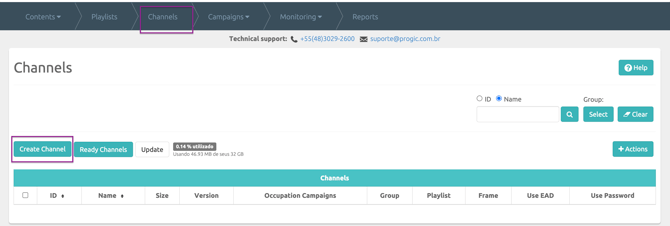
1º – Click on the **Channels** menu.
2º – Click on **Create Channel**.
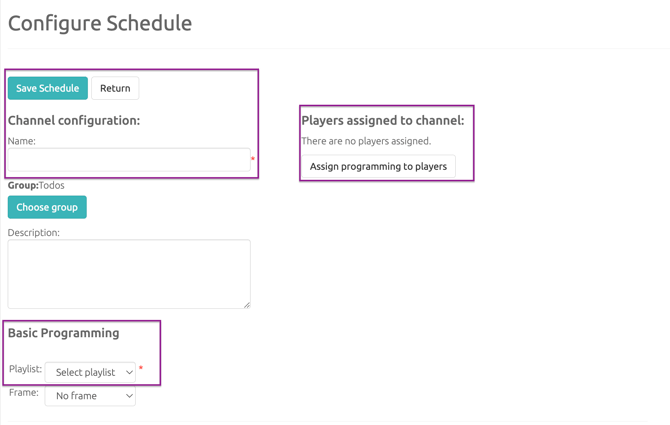
3º – Enter the channel name.
4º – Select the playlist you want to use in the channel.
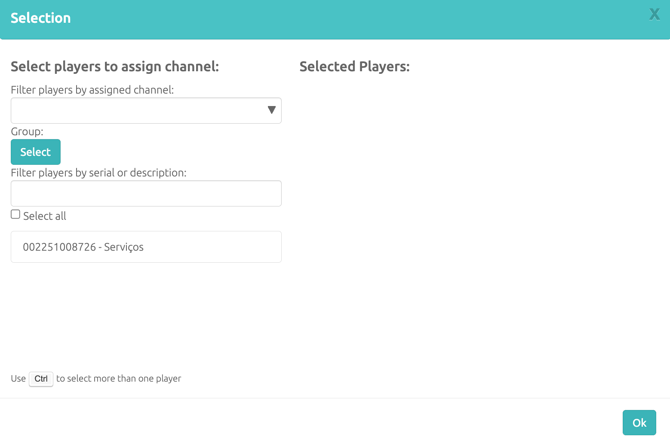
5º – Save the channel and assign it to a Player (Go to the **Players** tab → Select one of the listed players → Click on the **Actions** button → **Change Channel** → Select the created channel.)
- [Corporate TV](https://help.progic.com.br/en/corporate-tv?hsLang=en#main-content)
- [Channels & Campaigns](https://help.progic.com.br/en/corporate-tv?hsLang=en#channels-campaigns)
- [Media and Uploads](https://help.progic.com.br/en/corporate-tv?hsLang=en#media-and-uploads)
- [Creative Resources & Editorial Sections](https://help.progic.com.br/en/corporate-tv?hsLang=en#creative-resources-editorial-sections)
- [Playlists](https://help.progic.com.br/en/corporate-tv?hsLang=en#playlists)
- [Connectivity & Network](https://help.progic.com.br/en/corporate-tv?hsLang=en#connectivity-network)
- [User Management & Access](https://help.progic.com.br/en/corporate-tv?hsLang=en#user-management-access)
- [Manager](https://help.progic.com.br/en/corporate-tv?hsLang=en#manager)
- [Broadcast and Monitoring](https://help.progic.com.br/en/corporate-tv?hsLang=en#broadcast-and-monitoring)
- [Platform](https://help.progic.com.br/en/platform?hsLang=en#main-content)
- [Integration and Security](https://help.progic.com.br/en/platform?hsLang=en#integration-and-security)
- [Settings and Permissions](https://help.progic.com.br/en/platform?hsLang=en#settings-and-permissions)
- [Management and Operations](https://help.progic.com.br/en/platform?hsLang=en#management-and-operations)
- [Tips and Best Practices](https://help.progic.com.br/en/platform?hsLang=en#tips-and-best-practices)
- [Apps](https://help.progic.com.br/en/apps?hsLang=en#main-content)
- [Mobile](https://help.progic.com.br/en/apps?hsLang=en#mobile)
- [Desktop](https://help.progic.com.br/en/apps?hsLang=en#desktop)
[](https://progic.com.br/?utm_source=hubspot)
Copyright © 2026, Progic