---
title: "[Progic] Change the Company Logo in Progic Manager"
description: Learn how to easily change and customize your company logo in Progic Manager with this step-by-step guide. Ensure proper image dimensions for optimal display.
---
[Skip to content](https://help.progic.com.br/en/change-the-company-logo-in-progic-manager#main-content)
- [English](https://help.progic.com.br/en/change-the-company-logo-in-progic-manager)
- [Español](https://help.progic.com.br/es/cambiar-el-logotipo-de-la-empresa-dentro-de-progic-manager)
- [Português](https://help.progic.com.br/pt/alterar-o-logotipo-da-empresa-dentro-do-progic-manager-)
English
Show submenu for translations

Open main navigation
Close main navigation
- - [English](https://help.progic.com.br/en/change-the-company-logo-in-progic-manager)
- [Español](https://help.progic.com.br/es/cambiar-el-logotipo-de-la-empresa-dentro-de-progic-manager)
- [Português](https://help.progic.com.br/pt/alterar-o-logotipo-da-empresa-dentro-do-progic-manager-)
English
Show submenu for translations
- [Contact us](https://ty05a.share.hsforms.com/2RIyv8iaWR9qVScnzVXKQSQ)
[Contact us](https://ty05a.share.hsforms.com/2RIyv8iaWR9qVScnzVXKQSQ)
How can we help you?
- There are no suggestions because the search field is empty.
1. [Central de Ajuda](https://help.progic.com.br/en?hsLang=en)
2. [Corporate TV](https://help.progic.com.br/en/corporate-tv?hsLang=en)
3. [Manager](https://help.progic.com.br/en/corporate-tv?hsLang=en#manager)
# \[Progic\] Change the Company Logo in Progic Manager
## How to customize your company logo in Manager
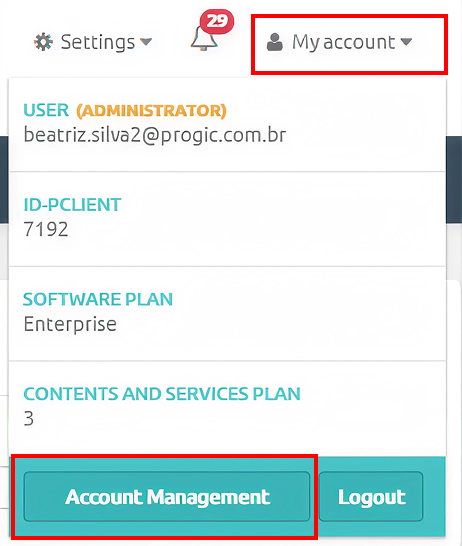
- Go to the **My Account** menu and click the **Account Management** button
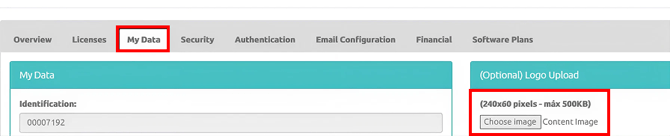
- Go to the **My Data** tab
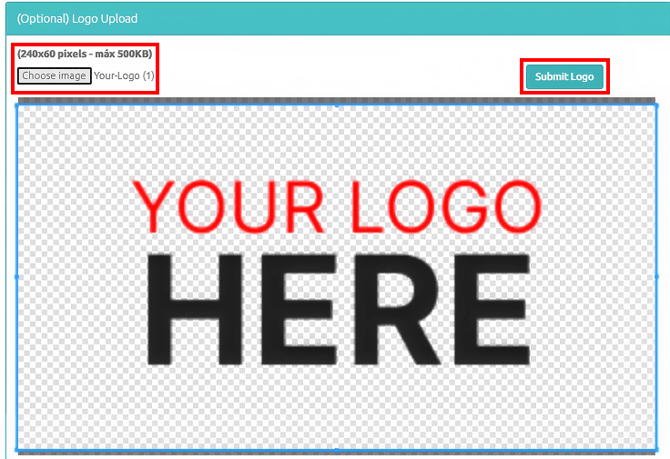
- Select the image using the gray button labeled **“Choose Image” (please note that the image must be 240x60 pixels in size to avoid distortion)**
- After selecting the image, simply click the **Upload Logo** button (green button)
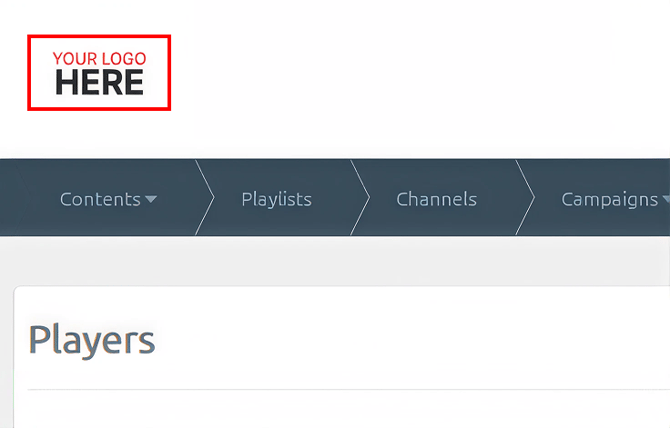
- Done, you have changed your company's **logo** in Progic Manager.
- [Corporate TV](https://help.progic.com.br/en/corporate-tv?hsLang=en#main-content)
- [Channels & Campaigns](https://help.progic.com.br/en/corporate-tv?hsLang=en#channels-campaigns)
- [Media and Uploads](https://help.progic.com.br/en/corporate-tv?hsLang=en#media-and-uploads)
- [Creative Resources & Editorial Sections](https://help.progic.com.br/en/corporate-tv?hsLang=en#creative-resources-editorial-sections)
- [Playlists](https://help.progic.com.br/en/corporate-tv?hsLang=en#playlists)
- [Connectivity & Network](https://help.progic.com.br/en/corporate-tv?hsLang=en#connectivity-network)
- [User Management & Access](https://help.progic.com.br/en/corporate-tv?hsLang=en#user-management-access)
- [Manager](https://help.progic.com.br/en/corporate-tv?hsLang=en#manager)
- [Broadcast and Monitoring](https://help.progic.com.br/en/corporate-tv?hsLang=en#broadcast-and-monitoring)
- [Installation & Initial Configuration](https://help.progic.com.br/en/corporate-tv?hsLang=en#installation-initial-configuration)
- [Platform](https://help.progic.com.br/en/platform?hsLang=en#main-content)
- [Integration and Security](https://help.progic.com.br/en/platform?hsLang=en#integration-and-security)
- [Settings and Permissions](https://help.progic.com.br/en/platform?hsLang=en#settings-and-permissions)
- [Management and Operations](https://help.progic.com.br/en/platform?hsLang=en#management-and-operations)
- [Tips and Best Practices](https://help.progic.com.br/en/platform?hsLang=en#tips-and-best-practices)
- [Apps](https://help.progic.com.br/en/apps?hsLang=en#main-content)
- [Mobile](https://help.progic.com.br/en/apps?hsLang=en#mobile)
- [Desktop](https://help.progic.com.br/en/apps?hsLang=en#desktop)
[](https://progic.com.br/?utm_source=hubspot)
Copyright © 2026, Progic