
Automatic Employee Integration API:
This is a type of integration where it is possible to configure a connection with an API that returns content in JSON format. In this way, Progic Manager will use the JSON from this API and perform the automatic management of employees within a Manager account, allowing the processes of employee creation, update, and deletion to be automated.
Credentials:
- Access the Settings menu and go to the OAuth API Credentials option;
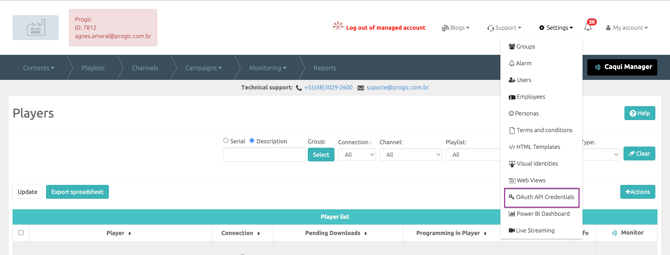
- Click on the +Add button;
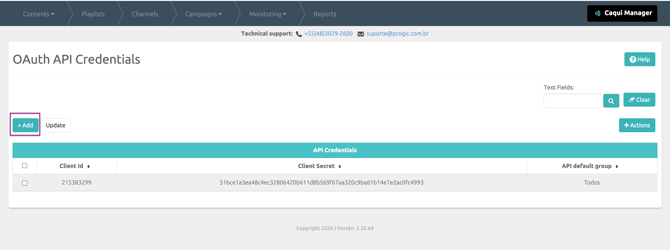
- In the API Credentials field, click the Generate Credentials button (this credential is unique and exclusive to the account in use);
- In the API Default Group field, you must select the default group to which registered employees will be assigned.
All employees will always be added to the group selected as default.
If there are employees who need to be linked to different groups, the adjustment must be made later in the Employee Registration screen by editing the employee’s record, or by sending the idgroup field defined in the API payload (see documentation at the end of this page); - In the Scopes field, you select the permissions that the API will have:
- EMPLOYEE_READ (read permission)
- EMPLOYEE_WRITE (write permission)
- EMPLOYEE_DELETE (delete employee permission);
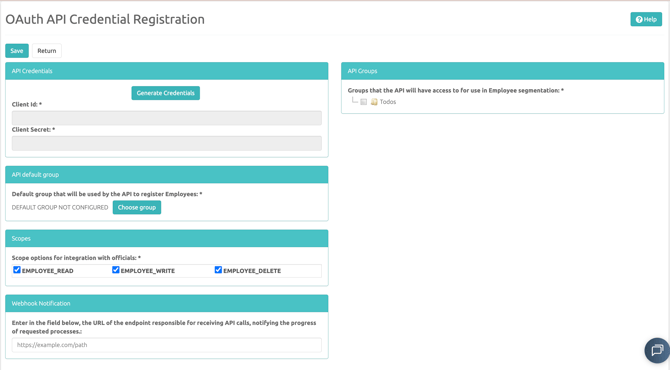
- In the field on the right, API Groups, you select which groups the API will have access to for employee management.
Note that if any group is not selected in this field, the Progic API will not have access to that group to perform automatic employee management; - After completing all the required settings, click the Save button to finish;
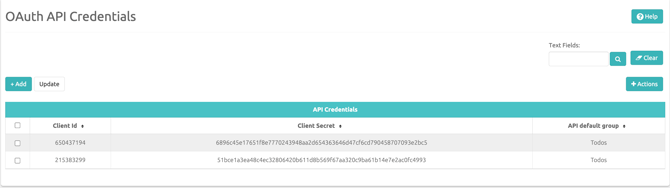
Example of how the credentials will be saved in the Manager after completing all configuration steps.
With the Client ID and Client Secret, you will need to access the documentation below to use the endpoints for automatic employee management via API: