---
title: [Progic] Desinstalando o SoftPlayer
description: Aprenda o passo a passo para desinstalar o Progic SoftPlayer. Saiba como remover o aplicativo pelo Painel de Controle do Windows e garantir a limpeza total dos arquivos.
---
[Pular para o conteúdo](https://help.progic.com.br/pt/desinstalando-progic-softplayer#main-content)
Português
Mostrar submenu para traduções

Abrir navegação principal
Fechar navegação principal
- Português
Mostrar submenu para traduções
- [Nosso contato](https://ty05a.share.hsforms.com/2RIyv8iaWR9qVScnzVXKQSQ)
[Nosso contato](https://ty05a.share.hsforms.com/2RIyv8iaWR9qVScnzVXKQSQ)
Como podemos ajudá-lo?
- Não há sugestões porque o campo de pesquisa está em branco.
1. [Central de Ajuda](https://help.progic.com.br/pt?hsLang=pt)
2. [TV Corporativa](https://help.progic.com.br/pt/tv-corporativa?hsLang=pt)
3. [Softplayers](https://help.progic.com.br/pt/tv-corporativa?hsLang=pt#softplayers)
# \[Progic\] Desinstalando o SoftPlayer
## Como remover o software do seu computador de forma segura
### Antes de desinstalar o Progic SoftPlayer primeiramente feche o software.
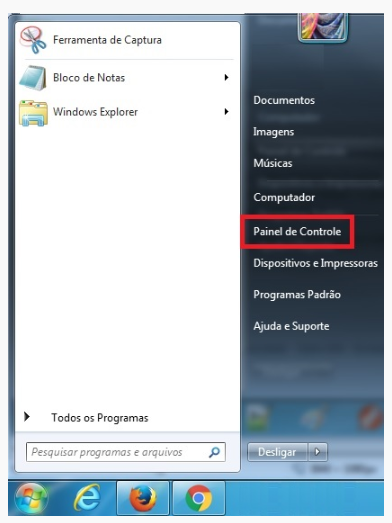
1º – Vá em Painel de Controle.
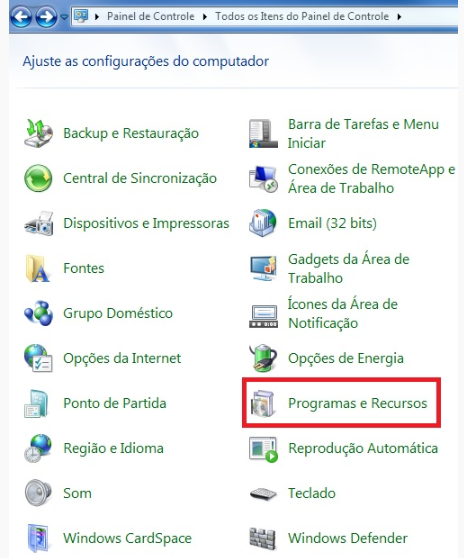
2º – Selecione Programas e Recursos.
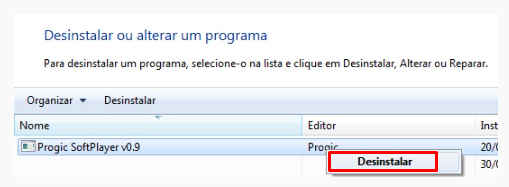
3º – Encontre o **Progic SoftPlayer** na lista, clique com o botão direito e depois Desinstalar.
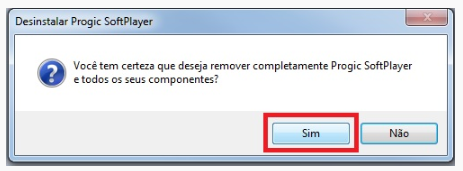
4º – Na tela de desinstalação clique em “Sim”.
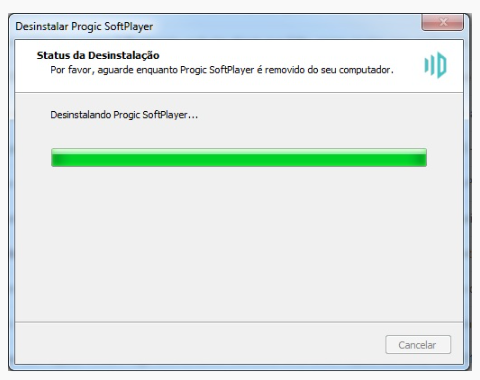
5º – Aguarde o processo de desinstalação.
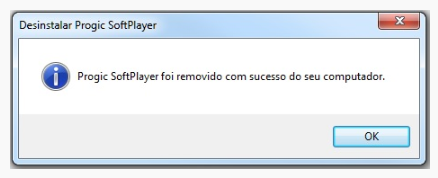
6º – Ao fim do processo de desinstalação deverá aparecer uma mensagem *“Progic SoftPlayer foi removido com sucesso do seu computador”*.
- [TV Corporativa](https://help.progic.com.br/pt/tv-corporativa?hsLang=pt#main-content)
- [Canais e Campanhas](https://help.progic.com.br/pt/tv-corporativa?hsLang=pt#canais-e-campanhas)
- [Mídias e Uploads](https://help.progic.com.br/pt/tv-corporativa?hsLang=pt#m%C3%ADdias-e-uploads)
- [Recursos Criativos & Editorias](https://help.progic.com.br/pt/tv-corporativa?hsLang=pt#recursos-criativos-editorias)
- [Playlists](https://help.progic.com.br/pt/tv-corporativa?hsLang=pt#playlists)
- [Conectividade & Rede](https://help.progic.com.br/pt/tv-corporativa?hsLang=pt#conectividade-rede)
- [Gestão de Usuários & Acesso](https://help.progic.com.br/pt/tv-corporativa?hsLang=pt#gest%C3%A3o-de-usu%C3%A1rios-acesso)
- [Manager](https://help.progic.com.br/pt/tv-corporativa?hsLang=pt#manager)
- [Transmissão & Monitoramento](https://help.progic.com.br/pt/tv-corporativa?hsLang=pt#transmiss%C3%A3o-monitoramento)
- [Instalação & Configuração Inicial](https://help.progic.com.br/pt/tv-corporativa?hsLang=pt#instala%C3%A7%C3%A3o-configura%C3%A7%C3%A3o-inicial)
- [Telas LG (WebOS)](https://help.progic.com.br/pt/tv-corporativa?hsLang=pt#telas-lg-webos)
- [Softplayers](https://help.progic.com.br/pt/tv-corporativa?hsLang=pt#softplayers)
- [Simplifica TV (Descontinuado)](https://help.progic.com.br/pt/tv-corporativa?hsLang=pt#simplifica-tv-descontinuado)
- [Plataforma](https://help.progic.com.br/pt/plataforma?hsLang=pt#main-content)
- [Integrações & Segurança](https://help.progic.com.br/pt/plataforma?hsLang=pt#integra%C3%A7%C3%B5es-seguran%C3%A7a)
- [Configuração e Acessos](https://help.progic.com.br/pt/plataforma?hsLang=pt#configura%C3%A7%C3%A3o-e-acessos)
- [Gestão e Operação](https://help.progic.com.br/pt/plataforma?hsLang=pt#gest%C3%A3o-e-opera%C3%A7%C3%A3o)
- [Dicas e Boas Práticas](https://help.progic.com.br/pt/plataforma?hsLang=pt#dicas-e-boas-pr%C3%A1ticas)
- [Aplicativos](https://help.progic.com.br/pt/aplicativos?hsLang=pt#main-content)
- [Mobile](https://help.progic.com.br/pt/aplicativos?hsLang=pt#mobile)
- [Desktop](https://help.progic.com.br/pt/aplicativos?hsLang=pt#desktop)
- [E-mail](https://help.progic.com.br/pt/e-mail?hsLang=pt#main-content)
- [Configuração e Segurança](https://help.progic.com.br/pt/e-mail?hsLang=pt#configura%C3%A7%C3%A3o-e-seguran%C3%A7a)
- [Dúvidas e Solução de Problemas](https://help.progic.com.br/pt/e-mail?hsLang=pt#d%C3%BAvidas-e-solu%C3%A7%C3%A3o-de-problemas)
- [Novo Gerenciador Caqui](https://help.progic.com.br/pt/novo-gerenciador-caqui?hsLang=pt)
[](https://progic.com.br/?utm_source=hubspot)
Copyright © 2026, Progic