
Once the editorial is created and live, publishing a news item is as simple as filling out a form.
The news item appears on the TV using the editorial's layout, on the dates and screens you choose.
How to publish a news item
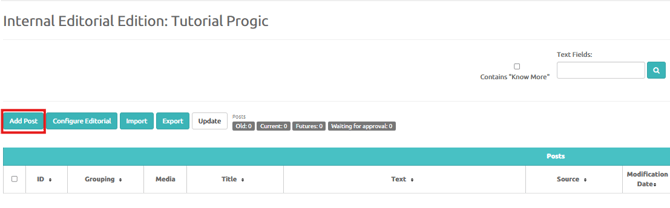
- Go to Content > Editorials. If there are many, enter the name in the search field and click the magnifying glass icon.
- Right-click the editorial and select Edit editorial.
- Click Add post.
- Complete the fields described in the table below.
- Click Save. The news item will become part of the schedule during the selected period.
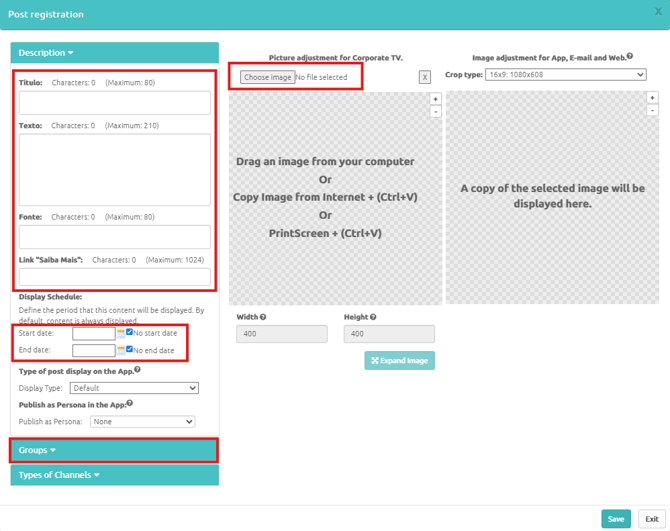
Post fields
| Field | What to fill in |
| Title | News title. |
| Text | News content. The counter turns red if the text exceeds the editorial character limit, helping prevent text from being cut off on the TV. |
| Source | Third text field, optional. It only appears if the editorial uses it. |
| Learn more | Link displayed by the TV as a QR Code to direct the employee to a specific action. |
| Display schedule | Start date and end date. Outside this period, the news item is not displayed. |
| Groups | Groups of TVs that will display the news item. |
| Image | News photo. Adjust the zoom and framing to highlight the best part using the Corporate TV adjustment. |
| Conditional image | Only appears if the editorial uses this feature. |
ℹ️ Field names may vary from one editorial to another because the person creating the editorial can customize the labels.
⚠️ The news item will only go live if the editorial's CTV is included in a playlist within the schedule. If the news item does not appear on the TV, check the channel playlist.
Edit a news item
On the editorial screen, right-click the post, select edit, make the desired changes, and click Save.
Related articles
- [Progic] Internal editorial: what it is and how to create one
- [Progic] QR Code - How to use it
- [Progic] What is the Conditional Image feature and how to use it in Creative
- [Progic] How to assign a group to a player
- [Progic] Instructions for adding content to a Playlist